Before you start
- Your company's Microsoft Entra app is set up in Boatwork, and the agent is allowed under Agent access.
- The sign-in for the agent's own mailbox and for the supervisor's mailbox.
- If your Microsoft tenant asks for admin approval, your IT administrator on a call or screen share, so they can approve it live.
Tip: use a private or incognito browser window, so Microsoft does not sign you in with the wrong account automatically.
Connect the agent mailbox
On your company's Overview, click the agent's name. In the agent's left menu, click Connectors, then Microsoft 365.
Next to Agent mailbox, click Connect agent mailbox.
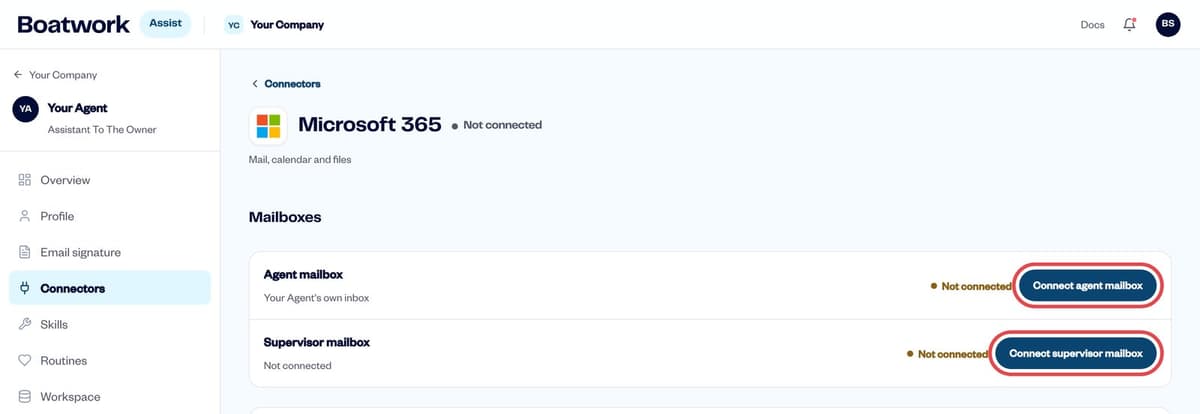
The agent's Microsoft 365 page Microsoft opens. Sign in as the agent's mailbox. The account you finish signing in with must be the agent's mailbox.
If Microsoft shows Need admin approval or asks an administrator to approve, your IT administrator signs in and approves it. You return to Boatwork when it finishes.
Connect the supervisor mailbox
The supervisor is the person the agent works for. Connect their mailbox when the agent should work with the supervisor's mail, calendar or OneDrive.
Next to Supervisor mailbox, click Connect supervisor mailbox.
Sign in as the supervisor. Your IT administrator approves if Microsoft asks.
Check the connection
On the agent's Microsoft 365 page, Agent mailbox and Supervisor mailbox both say Connected.
Repeat for each agent. The company Connectors → Microsoft 365 page lists every agent mailbox under Agent mailboxes.
Reconnect a mailbox
If every mailbox in your company shows Needs reconnecting at the same time, the Entra client secret has most likely expired. Renew the client secret; the mailboxes then reconnect on their own.
If only one mailbox is affected, open the agent's Microsoft 365 page, click Re-authorize (agent mailbox) or Connect supervisor mailbox, and sign in again as above.
Troubleshooting
| You see | What to do |
|---|---|
| "The signed-in account doesn't match … mailbox" | Microsoft finished with the wrong account. Use a private window and sign in as the agent's mailbox. |
| "That mailbox is already connected to the other slot" | The same mailbox is on both Agent and Supervisor. Disconnect it from one, or use a different mailbox. |
| "Need admin approval" | Your IT administrator approves the request, or grants admin consent for the app. |
| No Connect agent mailbox button | Allow the agent under Agent access on the company Microsoft 365 page. |


