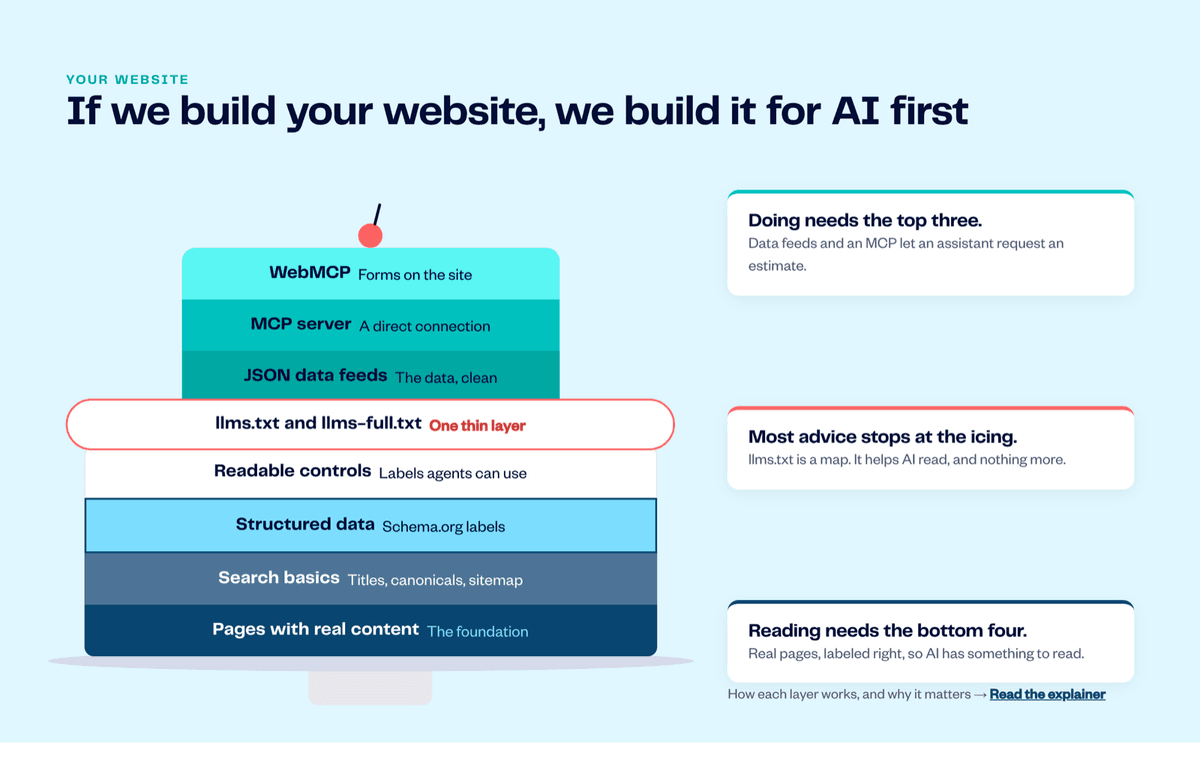
Making a website work with AI isn't one file or one plugin. It's eight layers, stacked like a cake, and most advice stops at the icing.
Boat owners now ask ChatGPT, Claude, Perplexity and Google's AI answers questions like "who can repower a center console near Stuart?" Those assistants do two different jobs. First they read the web to decide who to recommend. Increasingly they also do things for the person asking: check availability, fill in a form, request an estimate.
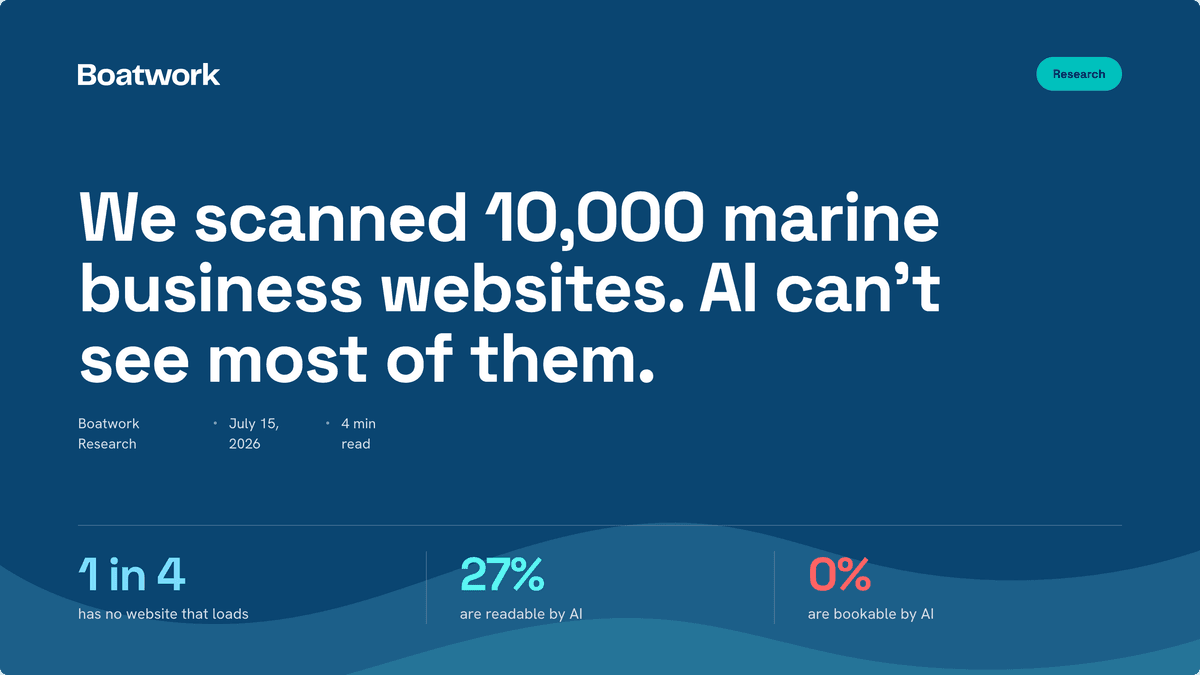
Reading and doing need different things from your website. When we audited 7,952 marine business websites, 25% didn't load for an AI at all, only 27% could be read by one, and 0% could be booked by one. This guide walks through the full stack, one layer at a time: what each layer is, what it takes, and why it matters.
The AI-ready website stack at a glance
From the foundation up:
- Pages with real content: the foundation
- Search basics: titles, canonicals, sitemap
- Structured data: Schema.org labels
- Readable controls: labels agents can use
- llms.txt and llms-full.txt: one thin layer
- JSON data feeds: the data, clean
- MCP server: a direct connection
- WebMCP: forms on the site
The bottom four let AI read your business. The top three let AI do something for a customer. llms.txt sits in between as a thin layer of icing: useful, but it isn't the cake. See the stack drawn out on our websites page.
Layers 1–4: what AI needs to read your business
1. Pages with real content
What it is. Real, specific pages about what you do: one page per service, your service area, your hours, your prices or how you price, and proof such as reviews and job photos.
What's required.
- A page for each main service ("bottom painting", "outboard repower", "detailing"), written about how you do it. Thin template text doesn't count.
- The basics in plain words: where you work, how to reach you, how fast you respond.
- Text that's actually in the page's HTML. Words baked into images, or loaded only after a script runs, are often invisible to AI crawlers.
Why it matters. Every other layer describes or exposes what's already on the page. If the page is thin, labeling it well only labels thin content. Assistants recommend the business whose site answers the question best.
2. Search basics
What it is. The housekeeping search engines have relied on for years: page titles, meta descriptions, canonical URLs, an XML sitemap and a robots.txt file.
What's required.
- A unique, descriptive title on every page.
- One canonical address per page, so duplicates and old URLs don't split the signal.
- A sitemap listing every page you want found.
- A robots.txt that doesn't accidentally block AI crawlers such as GPTBot (OpenAI), ClaudeBot (Anthropic) or PerplexityBot, unless you mean to.
- A site that loads quickly and reliably. A page that times out can't be read by anyone.
Why it matters. AI assistants lean on search indexes and their own crawlers to find pages. If a crawler can't reach a page, or finds three copies of it, the assistant never gets a clean read.
3. Structured data
What it is. Machine-readable labels, written in the Schema.org vocabulary and usually added as JSON-LD, that say exactly what each thing on a page is: a business, its address, its hours, a service, a review, a question and its answer.
What's required.
LocalBusiness(or a more specific type) with your name, address, phone, hours and service area.Serviceentries for what you offer, andFAQPagefor real questions you answer.- Labels that match what the page visibly says. Markup that disagrees with the page gets ignored.
Why it matters. Without labels, an AI has to guess whether "Mon–Fri 7–4" means opening hours or a tide window. With labels it doesn't guess. It's the difference between being read and being understood.
4. Readable controls
What it is. Buttons, links and form fields that say what they do, in the page's code, not just in how they look.
What's required.
- Real buttons and links instead of clickable boxes.
- Form fields with proper labels ("Boat make and model", not an unlabeled box).
- Clear names for icon-only buttons, the same accessible names that screen readers use.
Why it matters. AI agents that browse on someone's behalf, such as ChatGPT's agent mode, Claude in Chrome and Perplexity's Comet, read the page the way a screen reader does. If your "Request estimate" button is an unlabeled image, an agent can't find it, and the job goes to a site where it can. (We measured this with an agentic-browsing audit of marine websites.)
The icing: llms.txt and llms-full.txt
5. llms.txt and llms-full.txt
What it is. Two plain-text files at the root of your site. /llms.txt is a short Markdown summary of who you are, with links to your most important pages. /llms-full.txt holds the full text of those pages in one place. The format is a proposed convention, not an official standard.
What's required.
- A one-paragraph description of your business.
- A short, linked list of your key services and pages.
- A full-text companion that stays in sync with the site.
Why it matters, and why it's only the icing. llms.txt is a map. It can help an AI tool find and read your best content quickly, but support across AI tools is uneven, and it adds nothing if the pages underneath are thin or unlabeled. It also doesn't let an AI do anything. Most "optimize your site for AI" advice stops here. It's worth adding, but it's the thinnest layer of the cake.
Layers 6–8: what AI needs to act for a customer
6. JSON data feeds
What it is. Your business facts (services, service area, hours, prices or how you price, availability) published as clean, structured data that software can fetch directly, instead of scraping it out of web pages.
What's required.
- One source of truth for your services and details, published in a consistent, machine-readable format.
- Data that updates when your business does. A stale feed is worse than none.
Why it matters. When an assistant is about to act, say to check whether you do bottom jobs on 30-foot sailboats, it needs facts it can trust rather than prose it has to interpret. Clean data is what makes the next two layers reliable.
7. MCP server
What it is. An endpoint that speaks the Model Context Protocol (MCP), the open standard Anthropic introduced in late 2024 and now supported by Claude, ChatGPT and other AI tools. It offers a short menu of "tools", such as list services, get a page or submit an estimate request, that an AI assistant can call directly.
What's required.
- A public MCP endpoint, plus a discovery file (commonly
/.well-known/mcp.json) so agents can find it. - Read tools for your services and content, and one carefully scoped action: sending you an inquiry or estimate request.
- Guardrails: validation, rate limits, and a human (or your AI agent) who answers what comes in.
Why it matters. This is the step from "the AI read about you" to "the AI sent you a job". A boat owner can tell their assistant "find someone to wax my boat next week and ask for a price", and the assistant can request it from you directly, with no form-filling and no phone tag.
8. WebMCP
What it is. An emerging browser standard, proposed by engineers at Google and Microsoft and being incubated at the W3C, that lets a web page offer its own forms and actions to an AI agent working inside the visitor's browser. It's in early trials in Chrome.
What's required.
- Your key forms (request an estimate, book a slot) registered as tools the page offers to in-browser agents, with clear names and inputs.
- The same validation and confirmation your human visitors get.
Why it matters. With MCP, an assistant connects to your business from outside your site. With WebMCP, an agent that's already on your site can complete your form reliably instead of guessing which box is which. It's the cherry on top, and it's early, which is exactly why it's worth building in now.
What to do first
- Start at the bottom. Real service pages and clean search basics come before anything else.
- Label everything. Add structured data that matches your pages, and make sure every button and form field has a real name.
- Add the icing. Publish llms.txt and llms-full.txt, and keep them in sync with the site.
- Then let AI act. Publish clean data, an MCP endpoint that can take an estimate request, and WebMCP on your key forms.
- Answer what comes in. A request an AI sends at 9pm is only worth something if someone replies. That's what an AI agent for your business is for.
Not sure where your site stands? Run the free AI readiness audit. It checks your site the way an AI agent would.
Frequently asked questions
Is llms.txt enough to make my website AI-ready?
No. llms.txt helps an AI find and read your content, but it can't fix thin pages, missing labels or forms an agent can't use, and it doesn't let an assistant take any action. It's one thin layer of eight.
What's the difference between MCP and WebMCP?
An MCP server is a direct connection an AI assistant makes to your business from anywhere, even if no one ever opens your site. WebMCP works inside the browser: when an agent is on your page, your page tells it which forms and actions it can use.
Do AI assistants actually read structured data?
Search engines have used Schema.org markup for years, and AI answers draw heavily on those same indexes and crawls. Clear labels remove guesswork about your hours, services and location, whichever system is reading.
Should I block AI crawlers in robots.txt?
Only if you don't want AI tools to read or recommend your business. For a local service business that wants to be found, blocking crawlers such as GPTBot, ClaudeBot or PerplexityBot usually means being left out of the answer.
Can I do this on my current website?
The bottom layers, yes: better pages, titles, sitemaps, structured data and labeled forms are possible on most platforms. The top layers (data feeds, an MCP server and WebMCP) need a site built for them. That's how we build websites at Boatwork: AI first, from the foundation up.
Run a marine business? See how Boatwork builds AI-first websites · Check your site's AI readiness · Claim your free Boatwork listing.