Boatwork Live Chat puts a chat window on your Boatwork storefront and your own website, and you answer it from your phone. When a boat owner writes, you get an email right away. Tap Reply now and you're chatting, with no app to install. When you're busy, visitors can leave their name and number, or, with Boatwork Assist, your AI agent steps in. Live Chat is included with Presence and Growth starting today.
A boat owner who is ready to book doesn't want to fill out a form and wait two days for a call back. They want to ask "do you work on Yamahas?" and get an answer while they're still on your page. Most marine businesses miss those questions because nobody is watching the website. Live Chat sends each one to the person who can answer, wherever they are.
How Live Chat works
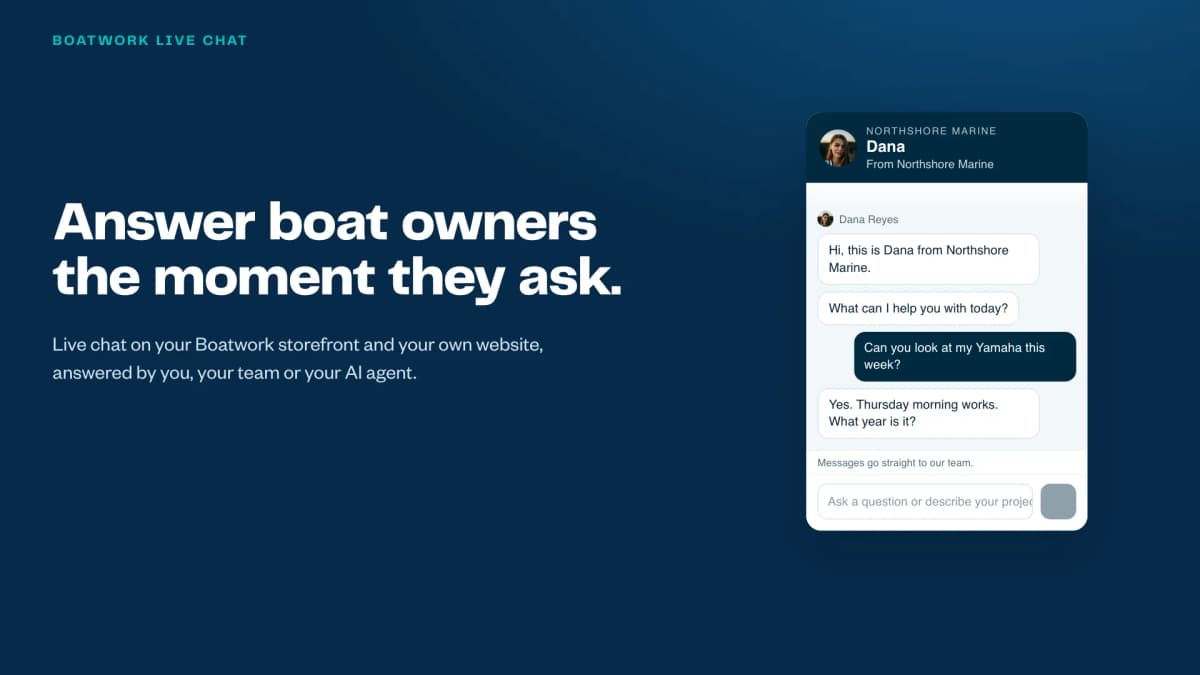
Here's the example from the animation. A boat owner near Fort Lauderdale is on Northshore Marine's website and asks whether they service Yamaha outboards. Dana, who runs the shop, gets an email on her phone a few seconds later: A visitor is waiting. She taps Reply now, a reply page opens in her phone's browser, and she types "We do! What year and horsepower is it?" Her answer shows up in the visitor's chat window a few seconds later.
The visitor sees Dana's name and photo, so they know a real person is answering. Dana sees roughly where the visitor is and what device they're on, and Business Center shows which pages they looked at, so she has some context before she answers.
When nobody is free
You choose how long a visitor waits for a person: 30 seconds, 1 minute or 90 seconds. If nobody answers in that time, or it's outside your business hours, the chat asks for a name and an email or phone number. You get an email with the whole conversation and the visitor's contact details. Every chat is also saved in Business Center, so anyone on your team can pick it up and reply.
Add an AI agent with Boatwork Assist
If you have a Boatwork Assist agent, it can answer your live chat too. You choose who answers: a person, your agent, or a person first and then your agent.
With a person first, you always get the first chance to answer. If you're with a customer, your agent steps in after the wait you chose and introduces itself as your assistant. It answers from your website and the files you give it, offers open times from your calendar and books the call, or takes an estimate request or a callback. When you're free again, just reply, and the chat is back with you.
On your storefront and your own website
Live Chat works in two places. On your Boatwork storefront, you switch it on in Business Center. On your own website, you copy one line of code from Business Center and paste it once, just before the closing body tag. Most site builders have a box for this, often called custom code or footer code. Business Center shows when the chat was last seen on your site, so you know it's working, and you can email the steps to whoever runs your website.
You stay in control
- Who answers. Pick the teammate who answers live, let your agent take every chat, or have a person go first and your agent step in.
- Your name and photo. Visitors see the name and photo you choose for the person and for the agent.
- Business hours. The person answers during your business hours. Outside them, visitors leave a message, or your agent answers.
- Who gets chat emails. Choose which teammates get an email for each new chat. The email includes the whole conversation.
- Every chat saved. Transcripts live in Business Center with the visitor's town, device and pages, and you can reply from there too.
Watch the full walkthrough
This 1-minute walkthrough puts it all together: a question on a website, a reply from a phone, an AI agent stepping in, a message left after hours, and the setup.
Who has Live Chat
Live Chat is included with Presence and Growth. Add Boatwork Assist to put an AI agent on your chat. If you already have Presence or Growth, open Business Center, go to Live chat and switch it on. To see every package side by side, compare the packages.
FAQ
What is Boatwork Live Chat?
A chat window on your Boatwork storefront and your own website. Boat owners ask questions, and you, your team or your AI agent answer while they're still on your page.
Do I need an app to answer chats?
No. You get an email when a visitor writes, and the Reply now link opens a reply page on your phone. You can also reply from Business Center.
What happens if nobody answers?
After the wait you choose, 30 seconds, 1 minute or 90 seconds, visitors can leave their name and an email or phone number. You get an email with the whole chat.
Does it work on my own website?
Yes. Copy one line of code from Business Center and paste it once on every page of your site. It also works on your Boatwork storefront.
Can an AI agent answer chats for me?
Yes, with Boatwork Assist. Your agent can answer every chat, or step in when you don't reply in time. It can book calls on your calendar and take estimate requests and callbacks.